
$
USD
Total Economic Impact
Total Economic Impact
[AssetMonthYear]



This asset is our source of truth for all available tags and styles when building Word-based Source Files for TEI, Dynamic TEI, and TLP digital assets. Use it as your reference when creating new source files to ensure consistency and alignment with approved styles. Please do not remove any existing tags or styles—this document should remain complete so everyone has the same reference point.
Add text later
{TagName}Content{/TagName}
The tag {FullStudy} is a required container for the main static content.
The tag {Calculator} is a required container for the main dynamic content.
The tag {HeaderToggle} is a required container for the toggle buttons in the header.
It is required to label the buttons as Read the study and Estimate your ROI for Dynamic Assets
The tag {HeaderTEI} is a required container for the the Hero Header.
Asset Company
Asset Subtitle
Asset Month Year
TEI Cover Page - StudyType
TEI Cover Page - Subtitle
TEI Cover Page - MonthYear
TEI Body Copy
TEI Section Subtitle,TEI Project Team
| TEI Table Header | TEI Table Header Number |
|---|---|
| TEI Table Body Copy | TEI Table Body Copy Number |
| TEI Table Footer | TEI Table Footer |
HTML attributes such as alt="" and title=""do not display.
Use Enter for paragraph break.
Lorem, ipsum dolor sit amet consectetur adipisicing elit. Magnam quam modi voluptatibus reiciendis eius, quos sunt dolorem blanditiis.
Voluptates quia recusandae sapiente quaerat!
Use Shift + Enter for soft returns for paragraphs in bullets.
Lorem ipsum dolor sit amet consectetur adipisicing elit. Rem ab voluptatem mollitia, eligendi beatae vel, officia modi minima ea unde repudiandae sunt aliquid obcaecati corporis! Facere voluptas quos unde atque.
Ea consequatur nesciunt, corrupti laboriosam non quaerat tempora ullam expedita. Dicta dolorem facere tenetur maiores deserunt eligendi quasi repellendus, autem atque voluptate.
Option 1
Text content
Option 2
Text content
The tag {CalloutFullWidth} should be used for callouts that have long text
Option 1
Text content
Option 2
Text content
Option 3
Text content
{CalloutStatisticBig} is usually used for two Callouts
Label text
[CONTENT]
Label text
[CONTENT]
Label text
[CONTENT]
Label text
[CONTENT]
Text content
You can have 2 callouts in {CalloutNumberStatisticIncrement}
Text content
Text Content
Text content
You can have 2 callouts in {CalloutNumberStatisticIncrementGreen}
Text content
Text Content
Text content
Text content
Include a visual of the pie chart with the value you want to insert in the {LeftDonutChartCallout}
Option 1
Subtitle text
Text content
Option 2
Text content
Text content
Text content
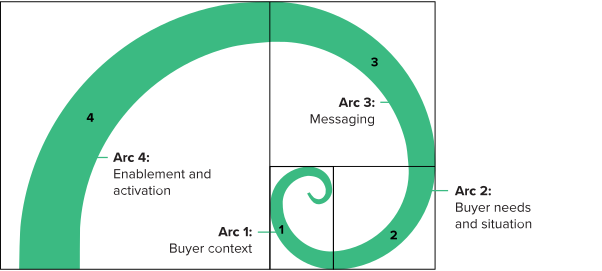
Figure description text
Caption text
Text content
Sub text
Base: Caption text
Source: Caption text
Option 2
Sub text
Base: Caption text
Source: Caption text
{PollRadio} is used when there is one option to select.
The max options for {PollRadio} are 10 TEI Body Copy
Sub text
Base: Caption text
Source: Caption text
Option 2
Sub text
Base: Caption text
Source: Caption text
To create a carousel item start a new Heading 6,TEI H6 following after TEI Body Copy
To create a table use the following table styles: TEI Table Title, TEI Table Header, TEI Table Header Number, TEI Table Body Copy,TEI Table Body Copy Number and TEI Table Footer
| TEI Table Header | TEI Table Header Number |
|---|---|
| TEI Table Body Copy | TEI Table Body Copy number |
The following are examples of tables that are normally used.
Example 1
| Role | Industry | Region | Revenue |
|---|---|---|---|
| Table body text | Table body text | Table body text | # |
| • Table body text • Table body text |
• Table body text • Table body text |
Table body text | # |
Example 2
| Ref | Benefit | Source | Year 1 | Year 1 | Year 3 |
|---|---|---|---|---|---|
| X1 | Table body text | Table body text | # | # | # |
| X2 | Table body text | Table body text | # | # | # |
| X3 | Table body text | Table body text | # | # | # |
| Table Footer: # | Table Footer: # | ||||
Example 3
| Ref | Benefit | Source | Year 1 | Year 1 | Year 3 |
|---|---|---|---|---|---|
| X1 | Table body text | Table body text | # | # | # |
| X2Low | # | # | # | ||
| X2Mid | Table body text | Table body text | # | # | # |
| X2High | # | # | # | ||
| Table Footer: # | Table Footer: # | ||||
Click to see data by reigon
Click to see data by reigon
Click to see data by reigon
Sub text
Base: Caption text
Source: Caption text
Sub text
Base: Caption text
Source: Caption text

Below a good right party contact rate
Below a good right party contact rate
Below a good right party contact rate
Below a good right party contact rate
| Ref. | Benefit | Year 1 | Year 2 | Year 3 | Total | Present Value |
|---|---|---|---|---|---|---|
| Atr | Improved payroll efficiency | $0 | $0 | $0 | $0 | $1000000 |
| Btr | Reduction in hourly worker turnover | $0 | $0 | $0 | $0 | $5000000 |
| Ctr | Improved scheduling efficiency | $0 | $0 | $0 | $0 | $4000000 |
| Dtr | Cost savings from retiring legacy systems and processes | $0 | $0 | $0 | $0 | $1100000 |
| Etr | HR administration time savings | $0 | $0 | $0 | $0 | $4200000 |
| Total benefits (risk-adjusted) | $0 |
| Initial | Year 1 | Year 2 | Year 3 | Total | Present Value | |
|---|---|---|---|---|---|---|
| Total costs | ($1,428,530) | ($1,094,160) | ($828,540) | ($4,976,630) | ($4,450,822) | ($1,625,400) |
| Total benefits | $0 | $2,004,300 | $3,195,000 | $4,389,750 | $9,589,050 | $7,760,670 |
| Net benefits | ($1,625,400) | $575,770 | $2,100,840 | $3,561,210 | $4,612,420 | $3,309,848 |
| ROI | 74% | |||||
| Payback period (months) | 18 months |
{GlossaryItems} is normally used for TEI Framework And Methodology, Glossary and Appendixes sections. {GlossaryItems} supports multiple lines of text,tables and endnotes.
Example 1
Body text
Example 2
Example 3
[CONTENT]
[CONTENT]
| Table header | Table number header |
|---|---|
| Table body text | Table number text |
| Table body text | Table number text |
Example 4
[CONTENT]
X Body text
Text content
The tags {EndDisclosures} {SectionDisclosures} are required containers for {Disclosure} content.
Consultant
Published date
The tags {/EndDisclosures} {/SectionDisclosures} are required containers to end the {Disclosure} and {ProjectTeam} content.
Footer title
Text content
The tags {Footer} and {SectionFooter} are required containers for {FooterPanelA} and {FooterPanelB} content.
About Forrester Consulting
Forrester provides independent and objective research-based consulting to help leaders deliver key transformation outcomes. Fueled by our customer-obsessed research, Forrester’s seasoned consultants partner with leaders to execute on their priorities using a unique engagement model that tailors to diverse needs and ensures lasting impact. For more information, visit forrester.com/consulting.
https://mainstayadvisor.com/go/mainstay/gdpr/policy.html
 PDF
PDF